Kotlin Multiplatform iOS on Windows, run and debug Kotlin on iPhone
This tutorial walks you through running the iOS app of a Kotlin Multiplatform project on an iPhone from Windows, setting breakpoints in both Swift and Kotlin in VS Code, and building an .ipa you can upload to App Store Connect. It works for both kinds of project, shared logic with a SwiftUI UI and shared UI with Compose Multiplatform. You need an Apple Developer account, an iPhone and a USB cable, and you need to have installed KXBuild.
Why the iOS app doesn’t build on Windows
The iOS side of a KMP project has two parts. Kotlin/Native compiles the shared Kotlin code into an iOS framework, and iosApp is an ordinary Xcode project whose Run Script phase calls Gradle to produce that framework and link it into the app. The official Kotlin toolchain only compiles iOS targets on macOS, and iosApp itself needs Xcode to build.
With KXBuild, KXBuild builds, installs and debugs iosApp, and neither your Gradle scripts nor the iosApp project need changes. The Android app still runs from Android Studio, and both sides share the same Kotlin code.
Set up your environment
Install Android Studio as described in the Kotlin Multiplatform docs, then search for and install the Kotlin Multiplatform plugin in Settings > Plugins. Android Studio comes with a JDK, which is all Gradle needs.
Keep writing the shared Kotlin code in Android Studio, where you get completion, refactoring and Android runs. VS Code handles the iOS build, Swift editing and on-device debugging.
Create a project
To use an existing project, open the KMP project root (the folder containing settings.gradle.kts) in VS Code with File > Open Folder…, or drag the folder into VS Code. Otherwise, create one with the JetBrains wizard.
- Open kmp.jetbrains.com, enter the project name and package name, and select Android and iOS.
- Under iOS, pick one option. “Share UI” gives you a Compose Multiplatform project with the UI written in Kotlin too. “Do not share UI” gives you shared logic with a SwiftUI UI.
- Download the zip and extract it to a short path such as
D:\work.
You can also use New Project in Android Studio with the Kotlin Multiplatform template. Select iOS there as well.
In the generated project, the shared code is in the shared or composeApp module (depending on the wizard options), and the iOS app is iosApp.xcodeproj in the iosApp folder. Open the project in Android Studio once, wait for the Gradle sync to finish and check that the Android app runs, then open the project root in VS Code. The KXBuild view lists the iosApp project and its targets.
Run doctor
Do this first when you open the project for the first time. Doctor checks your Kotlin Multiplatform setup and prepares the iOS project. The first run downloads a few hundred MB and takes a while. Run it again whenever you upgrade the project’s Kotlin version. Use either of these.
- VS Code extension. In the title bar of the KXBuild view, open the ··· menu and run Doctor (fix environment).
- Command line. Run the command below.
1kxbuild doctor D:\work\mykmpapp\iosApp\iosApp.xcodeproj
Set the bundle ID and team
Projects from the wizard keep the basic iOS settings in iosApp\Configuration\Config.xcconfig, including TEAM_ID, BUNDLE_ID and the app name. Set TEAM_ID to your developer account’s Team ID, which you can find on the Membership page at developer.apple.com. Change BUNDLE_ID to your own reverse domain, and use the same value when you register the App ID in your developer account.
Then, in the KXBuild view, right-click the iosApp target, choose KXBuild: Edit Target Settings, and check the final Bundle Identifier on the General page. It must match the App ID in your provisioning profile. Some templates append the Team ID to the bundle ID, so go by the value shown here. See Project Settings Editor.
Put the signing certificate and provisioning profile in the keychain folder. During development, use an Apple Development certificate and a Development provisioning profile that includes this iPhone. See Certificates and signing.
Write the shared code and iOS UI
Call Kotlin from a SwiftUI UI
Shared logic goes in commonMain, like the Greeting class the wizard generates.
1class Greeting {
2    private val platform = getPlatform()
3
4    fun greet(): String = "Hello, ${platform.name}!"
5}
In the Swift code of iosApp, import the framework generated from the shared module and call it like any Swift class. The framework name is baseName in the shared module’s build.gradle.kts, and the ContentView.swift from the wizard already has the import.
1import SwiftUI
2import Shared
3
4struct ContentView: View {
5    var body: some View {
6        Text(Greeting().greet())
7    }
8}
In Swift, Kotlin top-level functions live on a class named after the file plus Kt. For example, functions in Platform.kt are called through PlatformKt. The Swift code in iosApp gets completion, go to definition and error checking in VS Code. New Kotlin classes and methods only show up on the Swift side after one build.
Compose Multiplatform UI
In a “Share UI” project, the UI lives in the App() composable in commonMain. MainViewController() in iosMain wraps it in a UIViewController, and ContentView.swift in iosApp puts that into SwiftUI. The wizard generates all three, so day to day you only edit the Compose code in commonMain.
To call iOS-only APIs, declare an expect in commonMain and write the actual implementation in iosMain. Code in iosMain can use iOS frameworks such as UIKit and Foundation directly.
Run on your iPhone
Connect the iPhone with a cable. The first time, you need to install the Apple device drivers, tap Trust This Computer on the phone and turn on Developer Mode. See Set up your device. Then click the iPhone under the device node in the KXBuild view to make it the active device, and press F5.
KXBuild builds, signs, installs and launches the app, then attaches the debugger. The build calls Gradle to compile the Kotlin code. The first build also downloads Gradle dependencies and takes a while, and later builds only compile what changed. The first time you debug on a given iOS version, KXBuild downloads its device symbols. It’s several GB, but only once, and progress shows in a notification.
App output, including Kotlin println output, goes to Output > KXBuild Console. The build log is in Output > KXBuild, where you’ll find the full output when Gradle reports an error.
Debug Swift and Kotlin together
Open a Kotlin source file in VS Code, such as shared\src\commonMain\kotlin\...\Greeting.kt, and click to the left of a line number to set a breakpoint. Swift files work the same way, and breakpoints on both sides work in the same debug session.
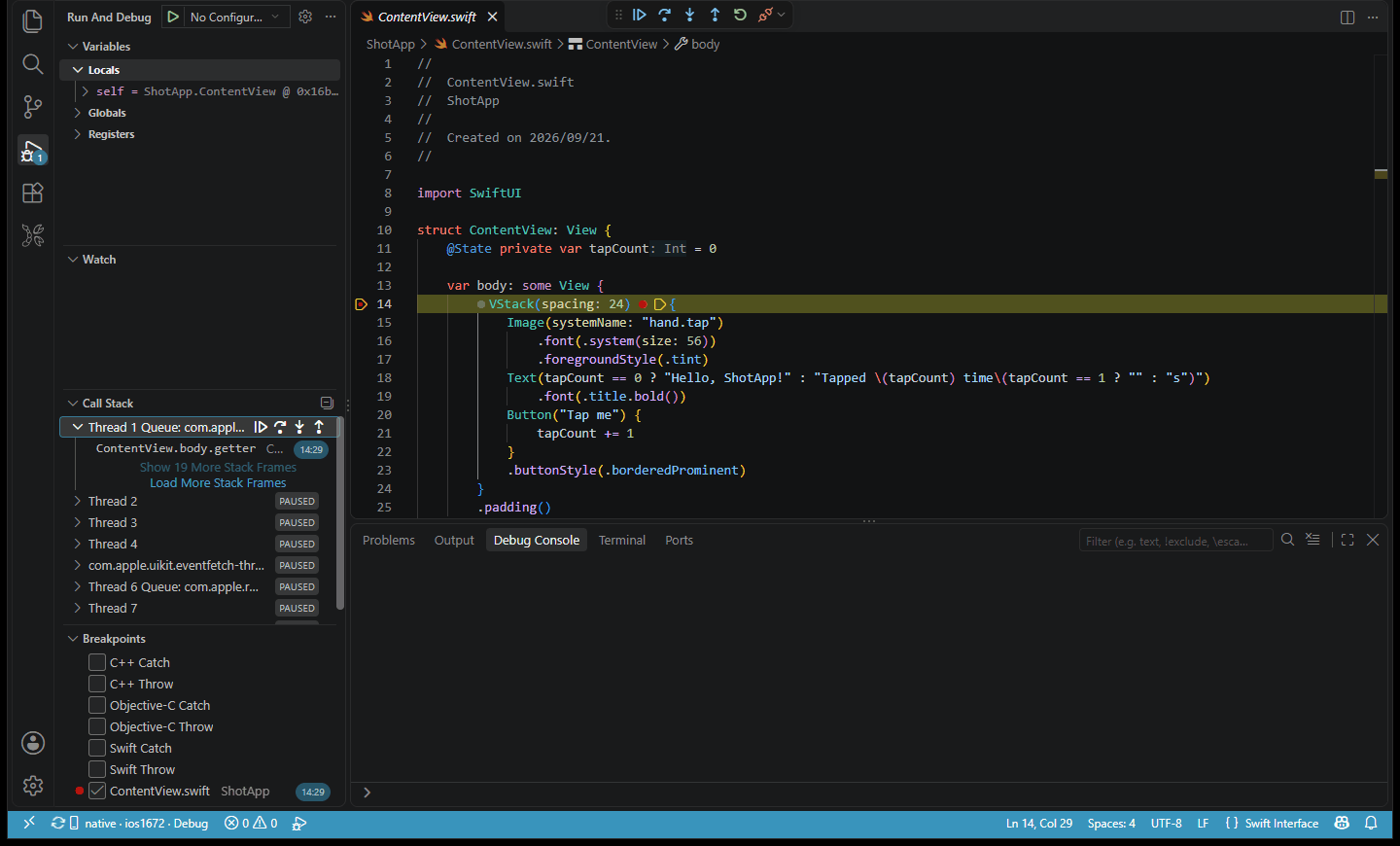
- When a Kotlin breakpoint is hit, Kotlin objects in the Variables view expand by class and field, and the call stack shows the full chain from Swift into Kotlin.
- When stopped on a Swift line that calls Kotlin, Step Into takes you straight into the Kotlin function.
- You can set breakpoints in both commonMain and iosMain, including in Compose composables and click callbacks.
- You can type lldb commands in the Debug Console. Inspect Kotlin values in the Variables view.
If breakpoints land on the wrong line or stop in assembly, check that the Build configuration node shows Debug. The Release configuration is optimized and isn’t suited to breakpoint debugging.
Rebuild after changing code
After changing Kotlin or Swift code, stop debugging and press F5 again. The build recompiles the Kotlin framework and installs it on the phone, so you don’t need to run a Gradle task in Android Studio first. The Restart button on the debug toolbar doesn’t recompile, so use F5 after code changes.
If you change dependencies in build.gradle.kts, just press F5 as well, and Gradle downloads the new dependencies during the build. After upgrading Kotlin or Compose Multiplatform, run doctor again before building.
Build a Release .ipa
Before submitting, raise the version. On the General page of the Project Settings Editor, change Marketing Version (the version shown on the App Store) and Current Project Version (the build number). Each upload to App Store Connect needs a higher build number than the last. The keychain folder needs an Apple Distribution certificate and an App Store provisioning profile. Use either of these.
- VS Code extension. Switch the configuration to Release in the Build configuration node of the KXBuild view, then run KXBuild: Build from the Command Palette.
- Command line. Run the command below in the project root.
1kxbuild build .\iosApp\iosApp.xcodeproj -c Release
A Release build compiles Kotlin in release mode, so it takes longer than Debug. When it finishes, you get an .ipa named after the app under iosApp\build. Upload it to App Store Connect with Appuploader on Windows, and when processing finishes, install it from TestFlight to check it on your iPhone before submitting it for review. See Release and App Store submission.
FAQ
The build fails with a Gradle error in the Run Script phase
Find the first Gradle error in Output > KXBuild. If you just pulled the project or upgraded Kotlin, run doctor again. Check that the project syncs in Android Studio, since Gradle’s own errors are the same on both sides.
Swift can’t find a new Kotlin class or method
Swift sees the framework from the last build. Press F5 or run KXBuild: Build once, and completion and error checking update. Code declared only in Android or other platform source sets isn’t visible to iOS. Put it in commonMain or iosMain.
A Compose app quits right after launch
Check the error in Output > KXBuild Console first. Compose Multiplatform needs CADisableMinimumFrameDurationOnPhone set to YES in Info.plist. The wizard’s Info.plist has it, and the app quits on launch if it’s removed or the Info.plist is replaced. Open iosApp\iosApp\Info.plist in the Property List Editor and add it back.
Install fails with a provisioning profile mismatch
The Bundle Identifier doesn’t match the App ID in the provisioning profile, often because the Team ID was appended to the bundle ID. Check the final value as described in Set the bundle ID and team. For other signing errors, see 16 common iOS code signing and .ipa install errors.
For other errors, see Troubleshooting.